Photoshop क्या है ?
Photoshop एक raster graphics editing software हैं, जिसका use photo editing, retouching, background remove, poster और digital design बनाने के लिए होता हैं.
कैसे करें: File > Open से image खोलें, फिर Tools और Layers की मदद से edit करें.
Example : किसी photo की brightness सुधारकर उसे JPG में save करना.
2.
Photoshop का मुख्य उपयोग
Photo correction, background removal, text design, thumbnail, poster और social media graphics के लिए Photoshop का use होता हैं.
Example:
YouTube thumbnail में image, text और effects add करना.
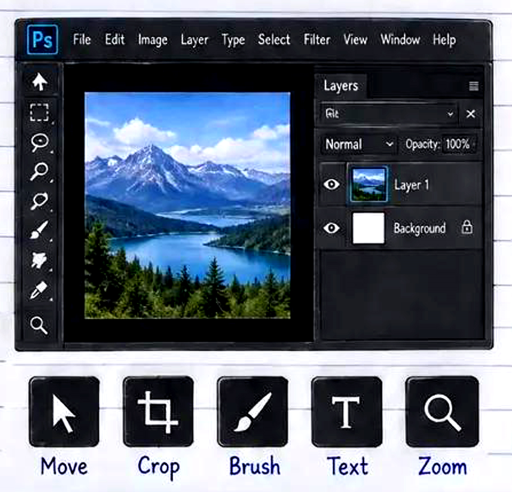
3.Photoshop के important features
Layers, Selection, Mask, Brush, Text, Adjustment और Filters इसके important features हैं.
Use: Layers से अलग-अलग elements को independently edit कर सकते हैं.
Example:
Background layer को touch किए बिना text layer का color बदलना.
- Photoshop के फायदे और limitation
फायदे : professional editing, creative control और high-quality output.
Limitation: यह सीखने में time लेता हैं और
high-resolution projects के लिए अच्छे RAM और graphics की जरूरत होती हैं.
Photoshop से बनने वाले projects
Passport photo, retouching, thumbnail, poster, banner, visiting card और wedding album design.
Practice : एक simple photo खोलकर crop, text और brightness adjustment करके save करें.
Photoshop Interface और Workspace
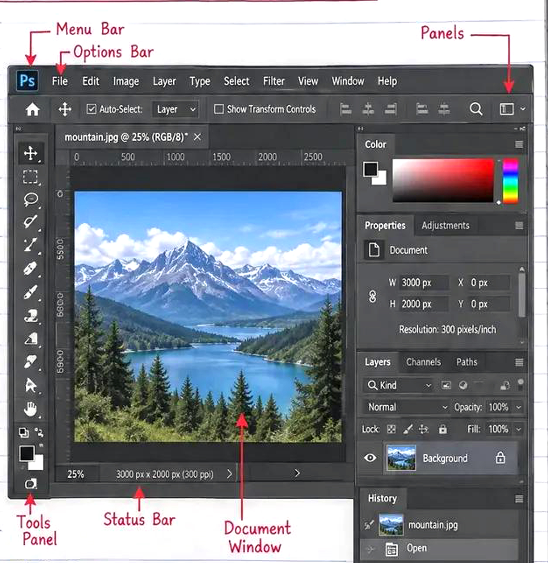
2. Menu Bar
Use: commands और settings access करने के लिए. कैसे: File, Edit, Image या Filter menu पर click करके option चुनें.-
Options Bar
Use: selected tool की settings
बदलने के लिए.
3.
कैसे: कोई tool select करें, फिर ऊपर Size, Mode, Opacity या Alignment बदलें.
Tools Panel
Use: select, crop, paint, retouch और draw करने के लिए.
कैसे: tool icon पर click करें; hidden tools के लिए icon को press-and-hold करें.
Document Window
Use: image को देखने और edit करने के लिए.
कैसे: File > Open से image खोलें और canvas पर काम करें.
5.
Panels
Use: Color, History, Properties और दूसरे controls manage करने के लिए.
कैसे: Window menu से panel show/hide करें.
6.
Layers Panel
7.
Use: image के अलग-अलग elements को independently edit करने के लिए.
कैसे: New Layer icon पर click करें, layer rename करें और eye icon से visibility बदलें.
Properties Panel
Use: selected layer, mask या adjustment की settings देखने के लिए.
कैसे: layer select करें और Properties में values बदलें.
Workspace
Use: काम के अनुसार interface arrangement बदलने के लिए.
कैसे: Window > Workspace से Essentials, Photography या Graphic Design चुनें.
Status Bar और Zoom
Use: document size और zoom level check करने के लिए.
कैसे: नीचे zoom value पर click करें या Ctrl + / Ctrl use करें.
Example: Photo open करें
Move Tool चुनें Layers Panel में New Layer बनाएं →Brush से edit करें File > Save As से PSD save करें.